
In the first part of this series, we highlighted several similarities between personal data backup and corporate digital archiving: the value of information, the importance of sorting, the relevance of heterogeneous storage, the integrity of documents, and the need to choose a provider that ensures reversibility. There’s still more to explore the parallels go even further.
Storage Migration: The Solution to Media Fragility
When dealing with physical data storage, one principle should always be kept in mind: no physical medium is 100% immune to failure or degradation. For example, a detailed study by cloud provider Backblaze found that the median lifetime of a hard drive is about 6 years and 9 months (calculated under continuous use, so likely longer in home environments).
It is therefore wise to migrate your data every two or three years from one medium to another. If an error occurs during migration, you have nothing to worry about as long as you’ve followed the golden rule: keep a separate backup copy. You can simply restore that copy and resume the process.
Modern archiving solutions such as Arcsys take this further, automatically recovering intact data if a migration fails a luxury individual users may not have, but professionals can benefit from.
Retention Periods: Useful for Saving Space?
In corporate environments, document retention periods are essential for controlling storage costs. Keeping millions of files for fifteen years instead of ten can be very expensive. But does this principle apply to personal use?
Probably not in the same way. Individuals rarely accumulate administrative documents at volumes comparable to their collections of photos and videos. Most consumer digital safes or personal cloud storage platforms do not incorporate automatic retention rules by document type, which makes sense given this smaller scale.
The reasoning, however, is quite different for paper documents. Anyone who has accumulated two decades of administrative paperwork knows how quickly physical space runs out. For those cases, publicly available tables, such as those provided by official government portals, can help decide what to keep and for how long.
Metadata and Filing Structures
Does metadata still matter in an era of full-text search? The answer is yes for archiving. Even when search engines are powerful, large volumes of documents can produce too many results. Metadata helps categorize, filter, and contextualize information, but entering it manually is only practical when done in bulk or automated. After all, who wants to manually tag every bank statement with its account number and date?
In practice, most people already use a filing plan without realizing it simply by organizing documents into folders and subfolders. This folder hierarchy can and should be preserved in your backups. A sensible structure might include folders such as:
Insurance, Energy, Invoices, Family, Finances, Housing, Health, Work, Vehicles.
A second level of classification by year or by topic (e.g., by car model) helps with both organization and selective deletion once retention periods expire.
The Choice of File Formats
Another often-overlooked aspect is the longevity of file formats. Even if you back up your data carefully, you may find in the future that some files are unreadable because their formats are no longer supported.
Two common examples of obsolete formats include:
-
Microsoft Works files, once popular for office documents but discontinued in 2009.
-
RealPlayer media files, widespread in the 1990s but now long past their heyday.
While converters currently exist to migrate them to modern formats such as DOCX, ODT, PDF, MP3, or MP4, there is no guarantee they will still be available or functional in twenty years.
The takeaway: seek out and convert your obsolete files now to avoid problems later.
Crafting a Personal Backup Strategy
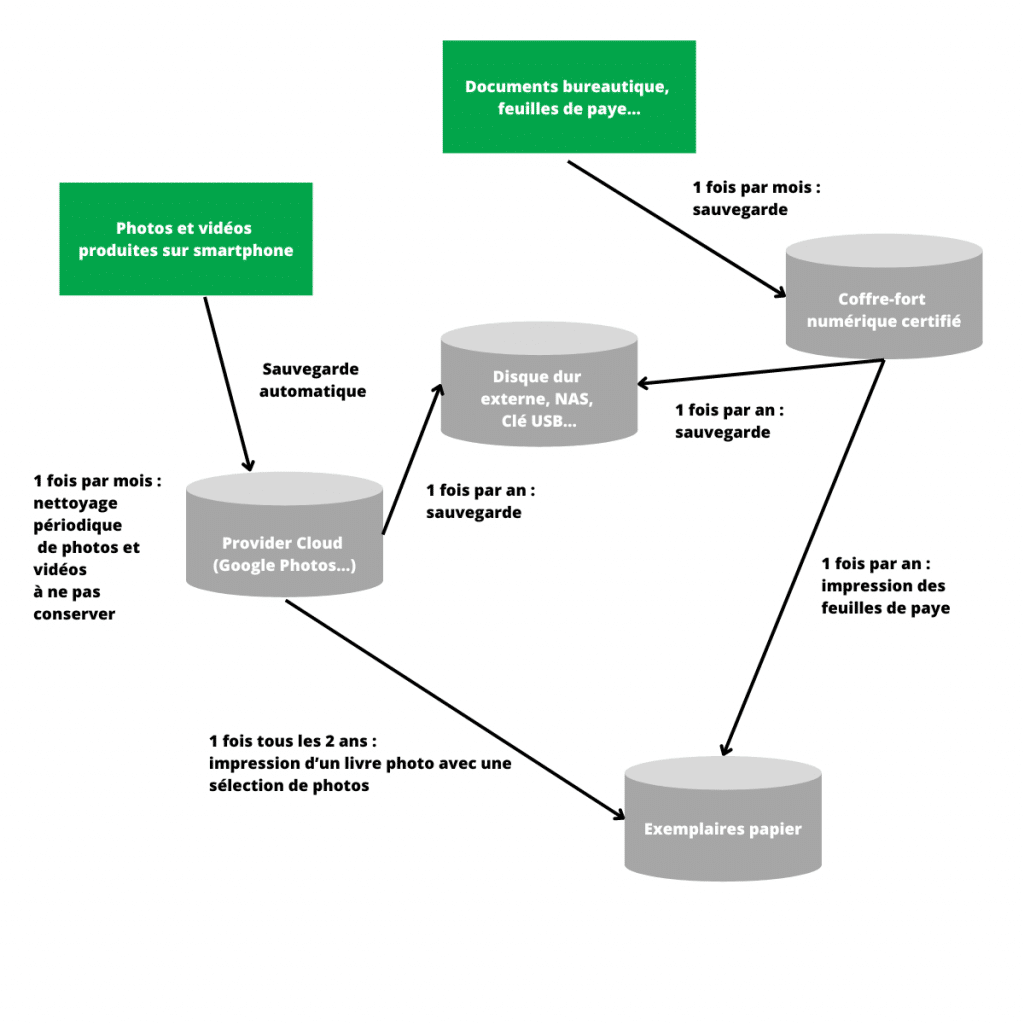
Finally, whether at home or at work, it’s worth developing a simple but structured personal backup strategy and sticking to it. Document your process in a spreadsheet, noting backup dates and locations.
To illustrate, our team created a personal example plan, tracking backup types, frequencies, and storage media. It doesn’t need to be complex; the point is consistency. Adapt it to fit your own habits, tools, and priorities, and you’ll be much better equipped to ensure the safety and long-term availability of your digital assets.